For managers · 1 min read
Set up notifications and shift reminders
Where employees get the schedule and reminders — Telegram, push, e-mail — and how to set reminder times and quiet hours.
This article is for admins and owners: how to make sure the schedule, shift changes and reminders reach everyone. It works if this feature is turned on for your company.
Steps
- Open Settings and find the Notifications to employees card.
- Under Channels, choose whether Push (browser, phone) and E-mail can be used. Telegram is always on.
- Under Shift reminders, turn on The evening before and set the time (for example, 19:00), and N minutes before the start (for example, 60).
- Set Quiet hours — for example, from 22:00 to 07:00.
- Click Save.
Where to find it
On a computer — Settings in the left menu; on a phone — More → Settings. Only admins and the owner see this card. Times follow the company time zone, shown in the same card.
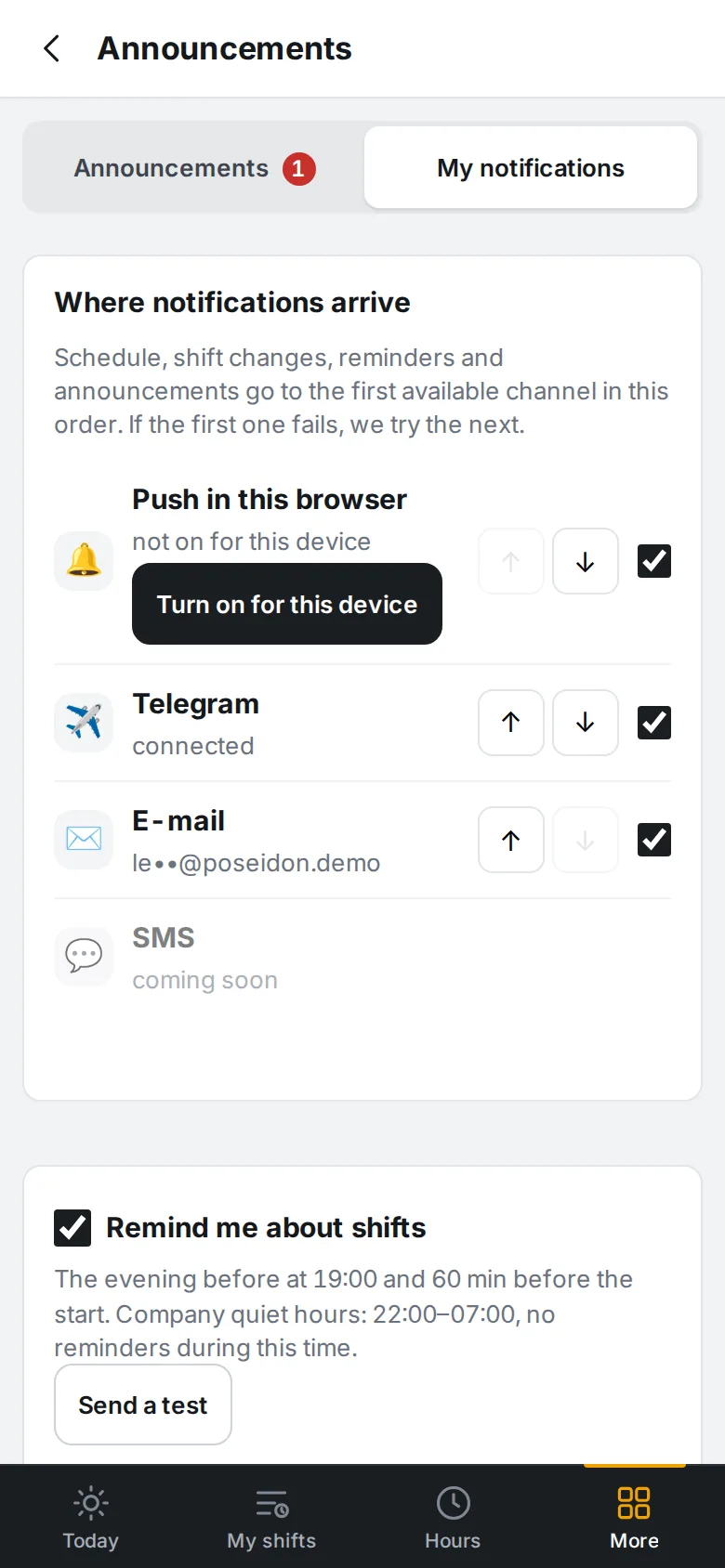
Each employee picks their own channels and their order: More → Announcements & notifications → My notifications. A message goes to the first channel that works; if it fails, we try the next one. There is also a Remind me about shifts checkbox and a Send a test button.
FAQ
What happens to reminders during quiet hours?
The evening reminder is not sent during quiet hours. The “N minutes before” reminder goes out as soon as quiet hours end.
Why doesn’t push arrive on iPhone?
On iPhone, push only works if IzyShift is added to the Home Screen and opened from there. Push doesn’t work inside Telegram or the Android app — a Telegram message arrives instead.