For employees · 1 min read
Log in to IzyShift for the first time
How to log in with the login and password from your email, reset your password, change the language and add IzyShift to your phone.
Your manager has added you to IzyShift — now you can see your shifts and clock in. Here is how to log in the first time.
Steps
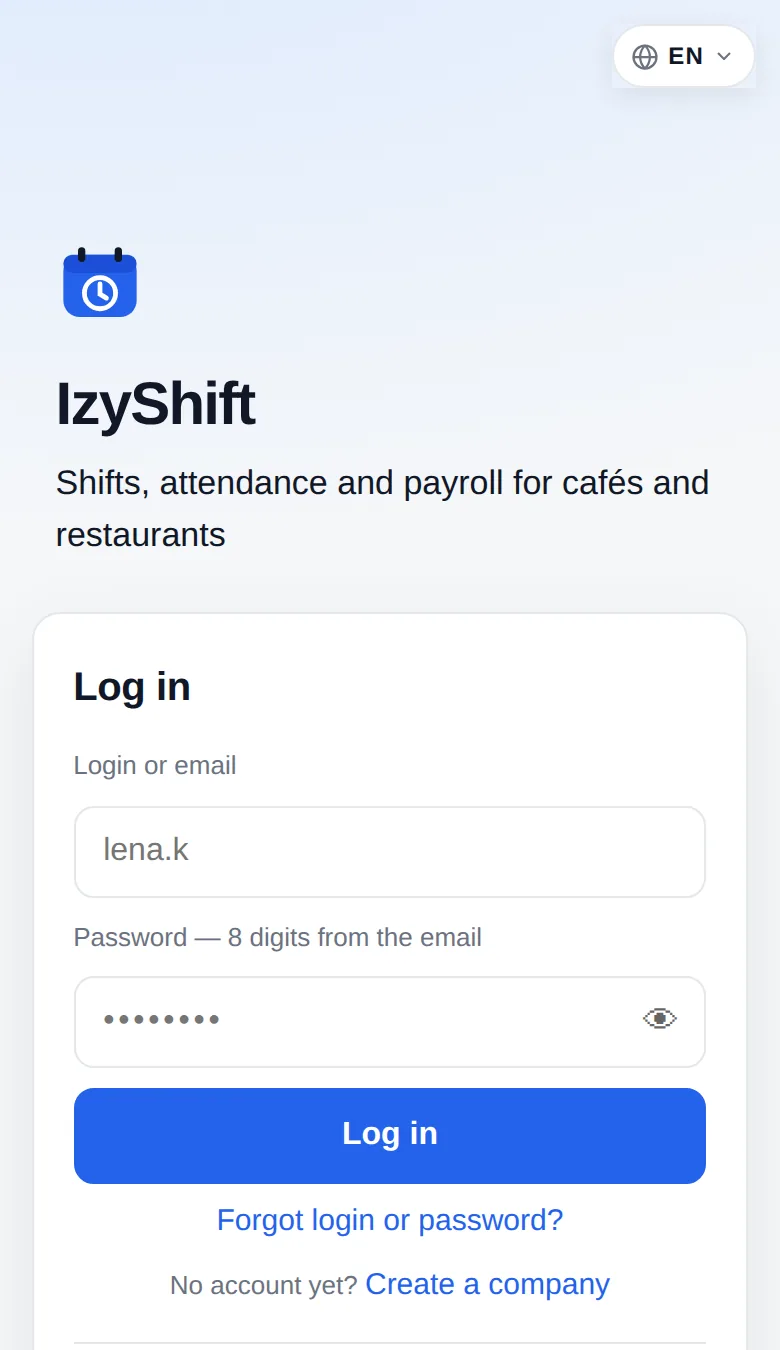
- Open https://app.izishift.cc in your phone’s browser.
- In Login or email, enter the login from your email or your work email address.
- In Password, enter the 8 digits from the email. No email? Your manager can give you the password.
- Tap Log in.
- To change the language, tap the globe button at the top: English, Русский, Українська, Ελληνικά.
- Add IzyShift to your phone’s screen. iPhone: in Safari, Share → Add to Home Screen. Android: in Chrome, menu ⋮ → Add to Home screen.
Where to find it
Log in at https://app.izishift.cc on your phone or computer. An Android app is coming soon to Google Play — until then, use the website.
FAQ
Forgot your password?
On the login screen, tap Forgot login or password?, enter your login or work email and tap Send a new password. You’ll get an email with your login and a new password. Can’t access your email? Ask your manager.
Can I log in with Telegram?
Yes. Once you connect Telegram, a Telegram login button appears on the login screen. See The @izyshift_bot bot for how to connect it.