For employees · 2 min read
Clock in and out on your phone
How to start and end your shift in IzyShift, and what to do if clocking in fails or you forgot to clock in.
You record your own start and end time — on your phone, in the bot or on the work terminal, as your manager has set up. Your hours are counted from these.
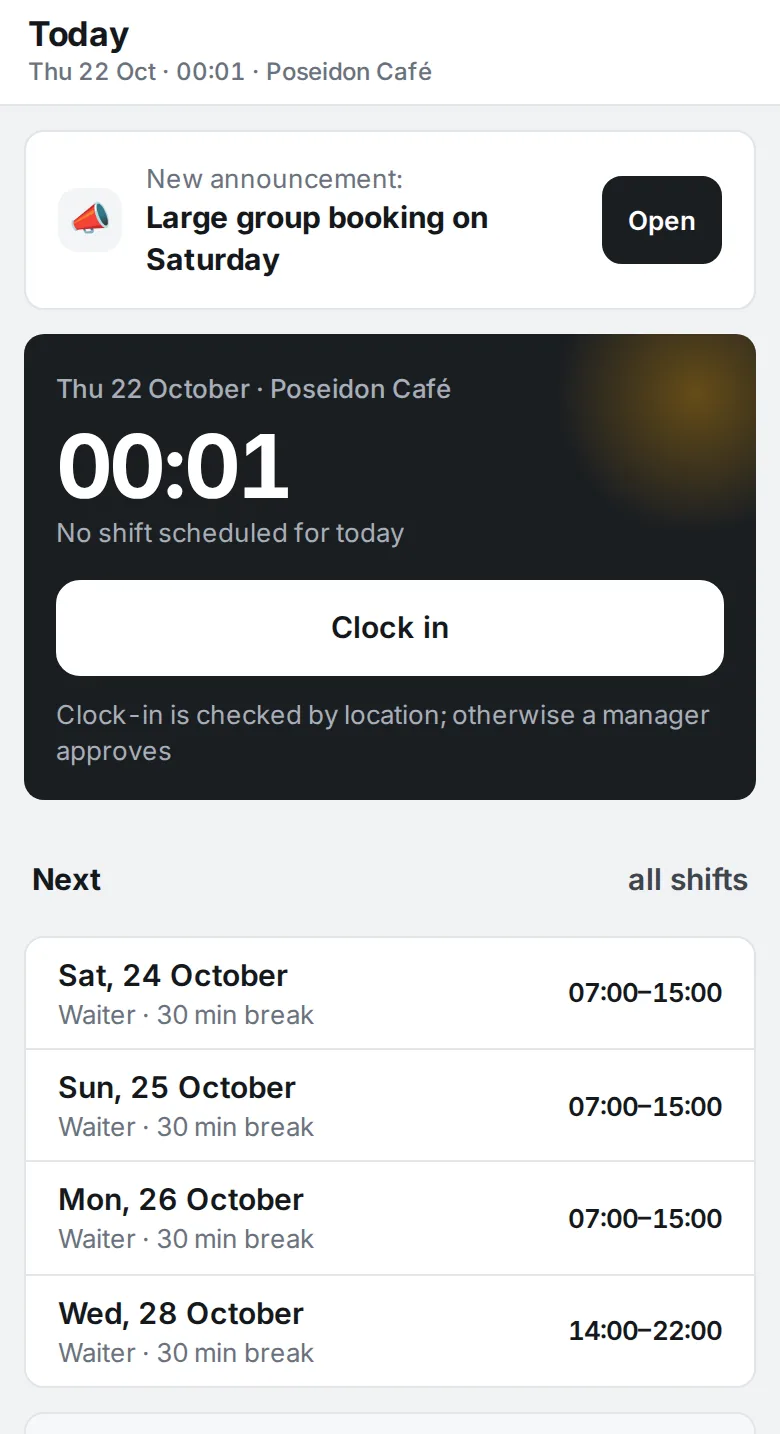
Steps
- When you arrive at work, open IzyShift — the Today screen.
- Tap Clock in. Below the button you’ll see “On shift since …”.
- At the end of your shift, tap Clock out. You’ll see how many hours you worked.
- If shift notes are turned on, a How did the shift go? card appears in the last hour of your shift — write a couple of lines.

Where to find it
The button is on the Today screen, on both phone and computer. The text below it tells you how clock-ins are checked: by the work Wi-Fi, by location, or approved by a manager.
Good to know
- Wi-Fi. Connect to the venue’s Wi-Fi and try again.
- Location. Allow your browser to use your location.
- Awaiting manager approval. Your clock-in is saved; a manager will approve it.
- “Clock in at the terminal in the venue”. You can’t clock in from your phone — use the tablet at work.
FAQ
Forgot to clock in?
Tap the button as soon as you remember. IzyShift asks Forgot to clock in? Choose “Yes, I’ve been here since … and I’m still working”, “Yes, I’ve been here since … and I’m leaving now” or “No, I’ve just arrived”. Your manager gets a request and confirms the time.
Tapped Clock out by mistake right after arriving?
If you clocked in only a few minutes ago, IzyShift asks again. Tap Stay on shift.